

To test a dishwasher turbidity sensor, locate the component near the sump basin under the tub, remove it, clean the optical lens, and use a digital multimeter to measure its electrical resistance. If the multimeter reading falls outside the manufacturer’s specified Ohm range, or shows zero or infinite resistance, the sensor is faulty and you must replace it.
Learning how to test dishwasher turbidity sensor components helps you find out why your dishwasher leaves dishes cloudy, greasy, or poorly rinsed. This small sensor reads soil levels in the wash water. A dirty or failed part confuses the control board and affects the entire wash cycle.
Before replacing parts, use this guide to check the sensor safely, clean the lens, and know when to call a technician for help. If your dishwasher also struggles to remove water, this may be connected to an issue with the dishwasher not draining.
What Are the Signs of a Faulty Dishwasher Turbidity Sensor?

Modern dishwashers use a turbidity sensor to measure the cloudiness or dirtiness of the wash water. When this sensor works correctly, it helps the control board decide how long the cycle should run and whether the water needs more rinsing.
When the sensor fails, the dishwasher may stop too early, rinse poorly, or leave food residue on dishes. Testing this part helps you avoid guessing and prevents you from replacing parts that still work.
The system depends on accurate water readings to clean dishes properly. A dirty lens, loose wire, or failed sensor leads to cloudy glassware, greasy plates, and wasted energy.
Safety Steps Before Testing a Dishwasher Sensor
Always disconnect the dishwasher from power before touching internal parts. Water and electricity create a serious shock risk. Turn off the dedicated circuit breaker and confirm the power is off with a non-contact voltage tester.
You can also review basic electrical safety guidelines before working near appliance wiring. This helps you understand why power must be fully shut off before you remove panels or disconnect parts.
Turn off the water supply valve under the sink before removing any component near the sump basin. Keep towels nearby because a small amount of water may drip out when you remove the sensor.
You should also check your owner’s manual before testing the part. Some manufacturers list specific Ohm ranges, diagnostic modes, or replacement instructions that apply only to your dishwasher model.
If you rent your home, contact your landlord or property manager before removing parts. Some rental agreements require approved repair service instead of tenant-led appliance repairs.
How to Prepare Your Tools for the Diagnostic Test
Before testing the turbidity sensor, set up your work area and gather the right tools. Good preparation helps you avoid water spills, electrical risks, and damage to nearby dishwasher parts.
- Clear the area around the dishwasher: Remove items from under the sink and create enough space to work comfortably.
- Place towels on the floor: A small amount of water may drip when you remove the sensor or access the sump area.
- Gather your tools: Keep a screwdriver, a non-contact voltage tester, a digital multimeter, a soft cloth, and white vinegar nearby.
- Avoid harsh cleaners: Strong chemicals can damage the plastic sensor lens and affect future water clarity readings.
- Shut off power and water: Turn off the circuit breaker and close the water supply valve before removing panels.
- Remove the lower toe kick panel: This gives you access to the lower dishwasher area, including the sump basin where the turbidity sensor is usually installed.
How to Test a Dishwasher Turbidity Sensor Step-by-Step
You test the component by accessing the sump area, removing the sensor, inspecting the optical lens, and measuring electrical resistance with a multimeter. A working sensor should match the manufacturer’s listed resistance range. A zero, unstable, or infinite reading points to internal failure.
Before replacing the part, clean it first. Mineral deposits and grease can block the optical lens, making a working sensor act like a failed one.
Step 1: Access the Dishwasher Sump Basin
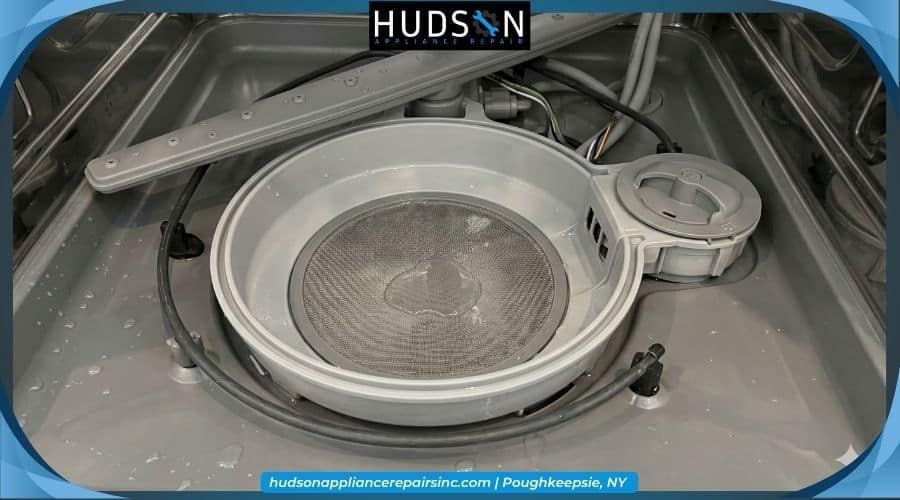
Remove the lower kick panel below the dishwasher door. This panel protects the bottom mechanical area and gives you access to the sump basin.
The sump basin is the plastic collection area at the bottom of the dishwasher tub. It holds water during the wash cycle and connects to several important parts, including the drain pump, filter area, and turbidity sensor.
Work slowly and keep screws in a small container so you do not lose them. Good lighting also helps you avoid pulling the wrong wire or damaging nearby parts.
Step 2: Disconnect and Remove the Turbidity Sensor
Find the small plastic sensor attached to the side of the sump basin. It usually has a wiring harness connected to the back.
Press the retaining clip and carefully disconnect the wiring harness. Then twist the sensor counterclockwise and pull it straight out.
Do not force the part. If it feels stuck, check for a locking tab or buildup around the seal. Pulling too hard can crack the plastic housing or damage the sump connection.
Step 3: Inspect and Clean the Optical Lens
Inspect the clear optical lens or prongs on the sensor. White scale, grease, soap film, or food residue can block the light beam used to measure water clarity.
Clean the lens with white vinegar and a soft cloth. Avoid scraping it with sharp tools, as scratches impair the sensor’s ability to read the wash water.
After cleaning, let the part dry and inspect it again. If the lens is clear and the wiring looks intact, the sensor may only have needed cleaning.
Step 4: Use a Multimeter to Measure Sensor Resistance
Set your digital multimeter to the Ohms setting. Touch the red and black probes to the metal terminal pins inside the sensor’s connection port.
Compare the reading with the manufacturer specifications listed on your dishwasher tech sheet or service manual. A reading of zero, infinite resistance, or a value far outside the listed range indicates that the internal circuit has failed.
Some turbidity sensors also include a built-in thermistor. This part reads the water temperature and helps the control board manage heating during the cycle. If the thermistor fails, the dishwasher may show heating, washing, or sensor-related errors.
Business owners who rely on kitchen equipment can schedule commercial appliance repair when dishwasher sensor problems affect daily operations. Testing internal electrical components requires care, especially when the appliance is used in a busy kitchen.
Step 5: Install the New Turbidity Sensor Replacement
Use an original equipment manufacturer replacement part whenever possible. Correct OEM parts help the dishwasher work as designed and reduce the risk of fitment or cycle issues.
A properly working dishwasher supports better energy and water use. You can review ENERGY STAR dishwasher standards to learn how efficient dishwashers reduce utility waste compared to older or poorly performing models.
Insert the new sensor into the sump basin and twist it clockwise until the locking tab clicks into place. Reconnect the wiring harness firmly so the control board can read the new part.
Turn the water supply back on, restore power at the breaker, and run a diagnostic cycle. Watch the lower area for leaks before reinstalling the kick panel.
If you replace the old sensor, check your local disposal rules before throwing it away. New York residents can review guidance on electronic waste recycling for proper disposal options.
When to Call a Local Appliance Repair Technician
Call a technician if the sensor tests bad, the wiring looks burned, the dishwasher shows repeated error codes, or you are not comfortable performing electrical tests.
A professional can confirm whether the problem is caused by the sensor, drain system, filter, pump, or control board. If you’re nearby, we handle dishwasher repair in Ulster County as well as the rest of the Hudson Valley.
If your unit is a Bosch model, our technicians handle its specific sensor and control layout as part of our Bosch dishwasher service. Call our team today for professional appliance repair when you want trained experts to inspect the issue and complete a lasting repair.
Frequently Asked Questions
Can a dirty turbidity sensor make dishes come out cloudy?
Yes. A dirty sensor can interfere with water clarity readings, leading to poor rinsing, cloudy dishes, or longer wash cycles.
Where is the dishwasher turbidity sensor located?
It usually sits near the sump basin at the bottom of the dishwasher and is often accessed through the lower toe-kick panel.
What tools do I need to test a dishwasher turbidity sensor?
You need a screwdriver, a voltage tester, a multimeter, towels, white vinegar, and a soft cloth for safe testing and cleaning.
How do I know if the turbidity sensor lens is dirty?
Look for white scale, grease, soap film, or cloudy buildup on the clear lens or prongs after removing the sensor.
Can I bypass a broken dishwasher turbidity sensor?
No. Bypassing it can affect cycle timing, water readings, and cleaning results. Replace the failed sensor instead.